
Templates - Consumer Feedback

People with hearing loss often don’t know what to write, or what terminology to use with ADA assistive listening systems (hearing loops, FM, infrared, or Auracast broadcast assistive listening system). Or even a claimed Audio Over Wi-Fi system.
To make it easier, we’ve put together some templates to help you get started. Please feel free to adapt a template. If you don’t like something, delete or change it. It can save you time—all you need to do is add the details and adapt them to your needs.
Often it’s best to point out what the law says they must do for the hearing disabled.
We are simply offering ideas and suggestions, rather than telling you what to do. It’s YOUR correspondence, not ours. You know the situation best. You need to be comfortable with whatever you submit. It is not legal advice.
Please email us if you need assistance or resources. Contact CHA. We may even be working on a draft template that may be relevant to what you might need.
Feedback
Feedback is both positive (compliments, keep doing what is working) and constructive about areas of improvement.
To keep your feedback short and simple, you can include handout(s) with your email, either as an attachment or include a link in your feedback.
As much as possible, document everything in writing, with names, emails, phone call logs, letters, photographs, etc.
Thank you-Assistive Listening System
The assistive listening system was great!
And it won’t change unless consumers speak up. Thanks to those of you who have the time and energy to do something.
Following Up with Earlier Promises
Medical provider website
- Who is the designated ADA person for [_medical facility name__]?
- What is the time frame to update your website so one may easily find the ADA person, and easily find information related to what accommodations are specifically available for patients who are hard of hearing or deaf?
- What specific processes will be updated/changed to better accommodate patients with hearing loss; how will this information be easily found by the patient?
Last Chance
Likely to submit complaint (Town Hall)
I wanted to give you a personal heads up about an issue that your staff has been alerted to. When [Senator _______] held a town hall at the [_______ auditorium] in the spring, there was no assistive listening system provided. Many people were simply unable to hear anything, so they left.
As I think you know, we [insert local work] have been working hard for the past [_____] years to understand why this element of accessibility provided for under the ADA is essentially completely missing in most community situations.
After the Senator spoke, I contacted School District _______ to understand why the Senator didn’t use their auditorium’s assistive listening system. It turned out that the Senator‘s staff brought in their own portable PA equipment and did not use any _______ tech support or equipment. But to our great surprise _______ told me that there is NO assistive listening system there to even plug into! That’s like saying there is no ramp for wheelchair users… and “tough luck”. [I have asked them if the new [______] has a system, since it is not apparent from their website, but have not received an answer.]
It turns out it is a huge national issue when “four wall” facilities, such as conference hotels, rent out their spaces and tell the renter that they are responsible for the required ADA-accessible listening system. This is NOT according to ADA, but it has become the national common practice.
Meanwhile, it means that your office will likely be told in many of the venues where you hold town halls that YOU will be responsible for hiring an outside AV company to bring in a temporary system.
My heads up to you is that it is likely that a formal DOJ complaint will be submitted against [______ School District] for being inaccessible after your town hall next week if folks can’t hear.
Please let me know if I can help your staff with this to think through how to deal. The participatory side of democracy is leaving out the 20+% of the community who have hearing loss — they won’t show up because they can’t hear at the event.
Best wishes,
Still not working (auditorium at senior community)
[short summary of how you what you have done thus far]
We are quite frustrated. We have lived at [senior community] for over [__] years and have been trying to get better hearing in the auditorium for a while now. I can provide you with copies of our emails that document our efforts if needed. I think our next step would be to submit a complaint with the [state name] Civil Rights Division, but we would rather give working with the management one more try before doing that. Please let me know how we should proceed. I look forward to an update regarding your efforts in this regard.
No action, prepared to submit complaint
I am writing you because staff have not responded after [___] interactions. My three requests:
- Meet ADA standards for assistive listening systems. Most likely [facility name] will need to hire a hearing loop expert to assess and fix the system. Here is a list of hearing loop experts.
- [facility name] staff to encourage the use of microphones for both presenters and audience members who ask questions. Or if there is no second microphone, for the presenter to summarize the question before answering. I understand even less when the microphone is not used.
- Inform visitors about the hearing loop so they can hear better. Promoting Your Assistive Listening System (Hearing Loop, FM/RF, and infrared) 2 pages
It saddens me that I even need to write this email, with my long-time involvement… [insert sentence]
While I don’t want to escalate the issue, please know that I’m prepared to follow through with submitting a discrimination complaint with the [state] Civil Rights Division 60-day marker, about [date], Department of Justice, or something else.
Last chance before submitting formal complaint (clubhouse)
I would like to inform you of an issue that I have been trying to resolve for a very long time. Please see the emails below. You will see that I think my next step will be to file a complaint with the state’s Civil Rights Division but prefer to give working with clubhouse management a try first.
It would be great if you could make that call to [installer name] and get the hearing loop working again. With a non-working hearing loop, multiple people are unable to understand the programs due to a lack of clarity. They are being left out.
- What do assistive listening systems sound like? (1-minute videos)
In addition, under the ADA, it is required to have an assistive listening system. Not having a working system is a civil rights violation – discrimination against a person with a disability. I hope we will not need to submit a complaint, but I have every right. I have given [facility name] more than ample time to come into compliance.
- Americans with Disabilities Act (ADA) standards (webpage and resources, including a 1-page summary)
Once you get the system working again, there are numerous templates that [facility name] can easily adapt. With information and education, more people can fully participate – and it’s a great marketing tool. Please feel free to forward this email to others.
Snippets of Language to Copy/Paste/Adapt
Need ideas? Not sure what language to use? Need ideas? Not sure what language to use? In the several sections below, there is basic language for you to customize for your situation. Most were all adapted from actual complaints filed.
Neckloops and Receiver Problems
A few sentences you can add to a basic feedback template, if either neckloops or receivers are a problem. Also a resource for neckloops and troubleshooting neckloops.
Static or buzzing when using a neckloop with an FM/RF system?
There should be no audible buzzing or humming when I listen. Here are two resource webpages
Could you please have a staff person find and solve the problems?
No neckloops?
The Americans with Disabilities Act (ADA) requires facilities to provide “hearing aid compatible” devices. A neckloop sends the audio directly to a telecoil in a person’s hearing aids or cochlear implants.
Headphones are not acceptable, as they create audible feedback (squeal), which can be heard by the consumer and people nearby. Furthermore, headphones worn over a hearing aid are not comfortable and do not provide good sound quality.
Resources
- To calculate the required number of neckloops:
- Online Receiver Calculator (ADA Northwest Center). Receiver calculator
- The ADA standards have a chart
- About neckloops and troubleshooting neckloops.
No receivers?
The Americans with Disabilities Act (ADA) requires facilities to provide receivers, headphones, and neckloops. A neckloop sends the audio directly to a telecoil in a person’s hearing aids or cochlear implants.
Headphones are not acceptable, as they create audible feedback (squeal), which can be heard by the consumer and people nearby. Furthermore, headphones over a hearing aid are not comfortable to wear and do not give good sound.
To calculate how many neckloops you need, here is an Online Receiver Calculator. Receiver calculator
Visit the webpage, ADA Standards for assistive listening systems, to learn more about the standards (this website).
Poor Quality Audio
A few sentences you can add to a basic feedback template, if you experience poor quality.
Echo or delay (latency) from Audio Over Wi-Fi system?
A consumer/user/patron should not hear any echo or a fuzzy sound from the assistive listening system.
Here is a latency demonstration at only 47ms, which is very noticeable. Would you like to listen to an entire event with this poor sound quality?
For background info, you can read about Audio Over Wi-Fi (this website).
Please email the Center for Hearing Access for a template (this website)
Lip syncing problem between reading lips and hearing the audio?
A consumer/user/patron should not hear the audio later than what they see from lipreading. The audio should match the lip reading. If it doesn’t, there is a latency problem in the assistive listening system and needs to be corrected.
Please email the Center for Hearing Access for a template (this website)
Wrong or Missing Signage
A few sentences you can add to a basic feedback template, if there is missing or wrong signage in the room.
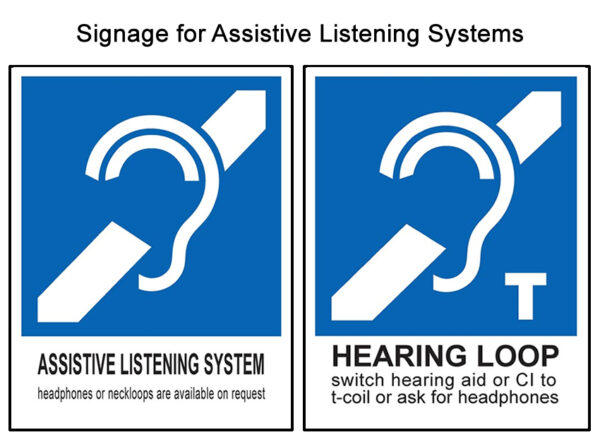
Wrong signage
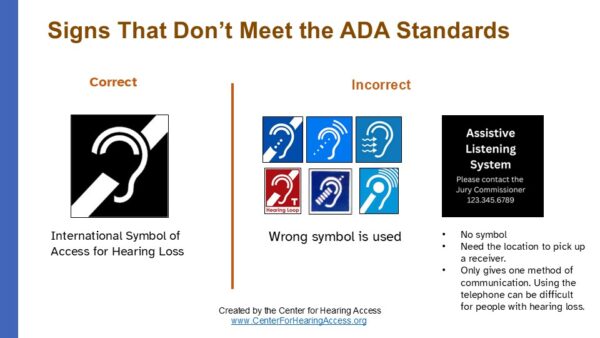
The sign needs to use the “International Symbol of Access for Hearing Loss.” In the United States, the background color is commonly blue. Below are examples of signs that don’t meet the ADA standards.
Missing Signage
Per the Americans with Disabilities Act (ADA), signs are required for assistive listening systems
- Signs (webpage, US Access Board, chapter 7)
You can make your own sign or contact your assistive listening system installer for a replacement sign.
The graphics webpage has
- Free graphics to download
- Examples of signs out of compliance
- Why it’s important to explain where to borrow equipment
Missing Information on Website
A few sentences you can add to a basic feedback template, if there is missing information on the facility’s website.
Missing accommodation information on webpage (short)
I was very surprised that the accessibility information was not easy to find on the (name) website a) at the bottom of every page b) on the contact page. On the (name) page, there was no mention of the hearing loops or any aids or services that are available for people with hearing loss (who don’t know sign language), even though information is required ADA Action Guide (webpage) Screenshots attached. Is the website undergoing improvements soon?
Add accommodation information to website (longer)
[intro. I recently visited…]
I poked around the [accessibility webpage, city council, and the transition plan]. I learned that “Auxiliary aids and services are available”. However, I found it very surprising that, so little information is provided on the [city] website for people with hearing loss (i.e., the majority of whom don’t know sign language), even though this type of information is required by the Americans with Disabilities Act. Please see ADA Action Guide (webpage):
- Title II entities. “Public entities are required to ensure that interested people, including people with hearing impairments, can obtain information as to the “existence and location of accessible services, activities, and facilities.” This is an important but frequently overlooked part of the regulations.”
I didn’t find any mention [in your materials or on your website] of the hearing loops or describing any aids or services that are available. It would be great to let people know what is available (a menu), such as Pocketalkers, ASR captions, CART, hearing loops, portable FM systems, etc. Throughout the country, hearing loss is often acquired by people aged 50+, and they don’t even know what is available since they have never been informed.
Resources for you:
- Some [Colorado] examples Lincoln Center-Ft Collins and Pikes Peak Library District and the City of Colorado Springs [delete these and add your own state examples]
- Here’s the webpage for [Insert Center for Hearing Access webpage with hearing loop list or state webpage] It includes information on [blah blah]
- Promotion of assistive listening systems. Templates and ideas that you/staff can easily adapt.
- Promoting Your Assistive Listening System: Hearing Loop, FM/RF, and infrared (2 pages)
- Graphics. Free downloads
- Audio test: for users and AV staff (pre-event). Short video clips so everyone knows the system is working prior to the event
I hope you can improve hearing accessibility for our [city].
[Conclusion]
Add information about assistive listening system to website (short)
Options. Choose what is applicable for you, and adapt.
- “friendly approach” To help people find and learn about your assistive listening system, I hope [INSERT facility name] will consider adding information to the webpage and other places. To make it easy, here’s a practical tool with paragraph templates to adapt Promoting Your Assistive Listening System, with Checklist (2 pages, pdf)
“friendly approach” I also looked around on the [facility name] website and didn’t find any information about accessibility: mobility, FM system, and other services.
- Here’s a nice example from Lone Tree Cultural Center
- A statement about the FM system can be easily adapted from this tool Promoting Your Assistive Listening System, with Checklist (2 pages, pdf). Note: as a [public entity], you’ll need to make information available about the FM system (see the back)
- “educational approach” I’m not sure that you are aware that per the ADA, Title II entities. “Public entities are required to ensure that interested people, including people with hearing impairments, can obtain information as to the ‘existence and location of accessible services, activities, and facilities.’ To ensure that the public can easily identify the ADA Coordinator, the person’s name and contact information must be provided to the public.” To make it easy, here’s a practical tool with paragraph templates to adapt Promoting Your Assistive Listening System, with Checklist (2 pages, pdf)
- “educational approach” For Title III entities, public notice is a best practice, but not required. However, it helps both the site and the public to provide advanced information on what accommodations are already available. That way, the owner/operators don’t answer the same questions over and over, and users can plan to attend or request something else they might need. To make it easy, here’s a practical tool with paragraph templates to adapt Promoting Your Assistive Listening System, with Checklist (2 pages, pdf)
Add information to court webpage
I am requesting your consideration to revise your webpage.
Suggestions:
1. Add an accessibility tab in the overall bottom navigation. Example: Transparency Online • Contact Us • Interpreters • ACCESSIBILITY • FAQ • Photos • Holidays
This webpage could provide an overview of the accommodations and services available for all disabilities, both visible and invisible.
2. Add specific accessibility information for people with hearing loss. How to a) borrow assistive listening system equipment (receivers/headphones/neckloops equipment) with location and checkout procedures and b) request CART (Communication Access Realtime Translation)
Why?
Earlier, when I was [describe the challenges you encountered], I could not find information about assistive listening systems. All courts are required to have these systems.
This information is also required for Title II entities (government)
“Public entities are required to ensure that interested people, including people with hearing impairments, can obtain information as to the “existence and location of accessible services, activities, and facilities.” This is an important but frequently overlooked part of the regulations.”
“To ensure that the public can easily identify the ADA Coordinator, the person’s name and contact information must be provided to the public.”
https://www.adaactionguide.org/action-steps#step3-providepublicnotice
Further information about assistive listening and the ADA:
- ADA requirements & Assistive Listening Systems (1 page, pdf)
Effective Communication - good template
(_____) will upon request, provide auxiliary aids and services leading to effective communication for people with disabilities so they can participate equally in the (________) programs, services, and activities. Examples include qualified sign language interpreters, documents in Braille, CART, and other ways of making information and communications accessible to people with disabilities. To request an aid or service for effective communication, please contact the ADA Coordinator as soon as possible. We will always try to accommodate any request, but the more advance notice we have for scheduling, the more likely an aid or service will be available.