
Senior Living Communities
Possible Assistive Listening System Locations
These systems should be available during a variety of settings, to provide accommodations for individuals with hearing loss.
- Classroom spaces
- Guided tours on field trips: mobile FM tour guide systems with receivers that folks can use either headphones or neckloops for those who have telecoils in their hearing aids/cochlear implants.
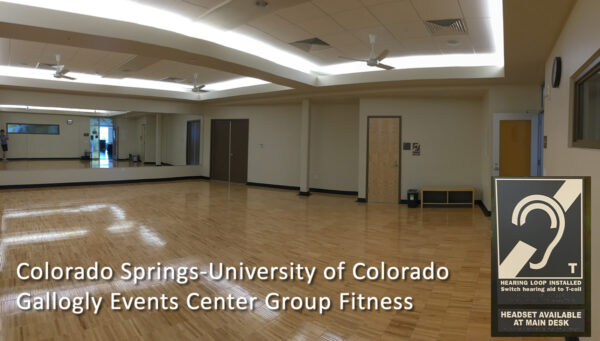
- Fitness rooms.
- Information Desks/Customer Service: a built-in counter hearing loop
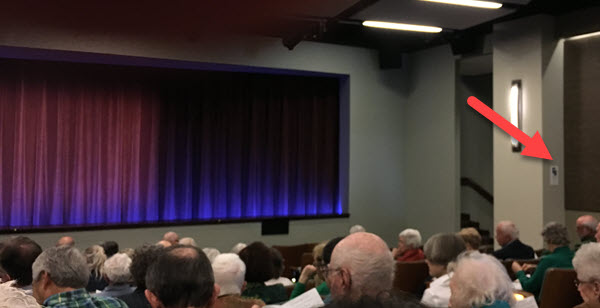
- Movie theaters and performing arts auditoriums
Handouts-Assistive Listening Systems
Handouts-Hearing Loss
How the hyperlinks work:
- image or title -> opens a new webpage with more information
- download icon at bottom -> direct download
Handouts-Hearing Aids
Support Groups – Ideas
Outline for beginning a support group
From Carolyn Odio, member of a CCRC community, and author of A-Z HEARING LOSS
Getting the word out: Publicity
Once you have a tiny planning group (2-5 people) interested in establishing a hearing loss support group, the next steps are to get organized, plan a program and assess your publicity access capabilities.
For example, Panorama has established “Intranet” called KYA with 50+ groups participating; this helps with publicity…as does our manually delivered monthly Panorama News with a calendar at the end of the publication (which I attach a sample below). Another form of publicity include announcements on our Panorama TV station (volunteer run).
Important: Publicity must reach those residents who do NOT use electronic devices such as email, computers, etc. This is especially critical in a Senior environment.
Programs
Finding an engaging program topic and speaker is the challenge.
–Do you have access to a Speakers Bureau?
–Does a member have access to an Audiologist, that uses “Best Practices”? Be careful – bring a good audiologist!
Virtual Programs
–You can join another group that has a meeting already set up virtually if you have basic equipment to handle a hybrid meeting (Zoom or Google Meet, etc.) That way you can use TED Talks, or YouTube videos from Dr. Cliff Olson, AuD. For preplanned programs. Also, check the USA Calendar on HLAA Leaders in groups.io
1) Meeting Room setup (I like chairs around a table format) in a cozy environment that comfortably fits the number of attendees. Obviously, there is guesswork involved in determining the right size for the first meeting.
2) Large Screen TV that can accommodate an HDMI cord to plug into a laptop. Check for an HDMI port on both devices.
3) Captions can be provided via a Zoom Call. In person I use one PowerPoint screen template on a laptop computer and enable the caption capability within PowerPoint. It captions anyone (speaker and attendees) that the computer audio picks up.
Meeting Sign-In
Be sure that everyone signs in to the meeting so you have a list of attendees for announcing future programs. I use the sign-in sheet to send out additional resources discussed in a meeting. For example if you are talking about Hearing Aids, I might send out a Hearing Aid Checklist out to those who have signed in. This encourages everyone to actually sign in!
Materials
Make sure you have resources and materials available at the meeting as well. Popular items include buttons that read “Face Me – I Have Hearing Loss,” Police Visor Cards or the Blue Envelope Program for a traffic stop, and DMV applications to put the hearing loss logo on your driver’s license. Find that information in A-Z HEARING LOSS DIRECTORY with a search.
Sound Advice meetings
Sound Advice is a free, volunteer, peer-led, information-sharing, and hands-on training forum for learning about assistive listening systems and devices and practicing using a hearing loop.
This Sound Advice link has outline and outline and free materials to use (this website)
Resources
Articles and documents
- ADA National Network. Know Your Rights! The Americans with Disabilities Act (ADA) & Older People.
- National Council on Aging. 5/13/22. Hearing Health for Older Adults: What Older Adults Need to Know About Hearing Loss
Center for Hearing Access
- Neckloops. All about neckloops (this website)
- Paragraph template and checklist. Describe your assistive listening system on your webpage. Promoting Your Assistive Listening System, with Checklist by the Center for Hearing Access (2 pages, pdf)
- Templates for facilities/sites: graphics, audio pre-event, handouts, ideas.
- Lists of hearing loops across the United States and Canada.
- Library. Zotero online library of articles, websites, and examples for senior living communities (webpage)