
Hearing Loops: Basic Troubleshooting

counter hearing loop laying on its side-not working
Regular checking of the hearing loop can alert staff to problems, such as the counter hearing loop not functioning (easy to fix-should be upright)
A wall junction box and plate with the hearing loop sticker. It shows the 2 exposed hearing loop wires, since the carpet is temporarily removed
A best practice is to always put a small sticker on wall plates, so when new people working the audio systems of a facility, no one is scratching their heads wondering “what’s that plate covering?”

It is frustrating when consumers encounter hearing loops that aren’t working, and being denied communication access as required under the ADA. Any assistive listening system will not work unless it is plugged in, turned on, and in the proper position.

If the system is turned on and there is no sound, contact a knowledgeable hearing loop installer for analysis.

Maintenance (for Facilities)

On the back of your counter hearing loop, either 1) tape this business card or 2) print on labels. Staff can learn and easily check that the counter hearing loop.

Counter Hearing Loops-staff training and checking (card 1 page, pdf)

Staff Training link or use the QR code below

QR Code for counter hearing loop-staff

Use a hearing loop receiver and headphones to listen. It’s a good practice to test weekly and verify during a microphone test before every event. It takes less than a minute. A test just before an event may be too late to troubleshoot. 

Every site should have hearing loop receivers for people who do not have hearing aids or people with hearing aids and no telecoils. The number of receivers is based on the capacity. Receiver calculator Northwest ADA Center (website).  Battery and rechargeable (Contacta website) receivers are available as well as receivers with testing device (Univox website)
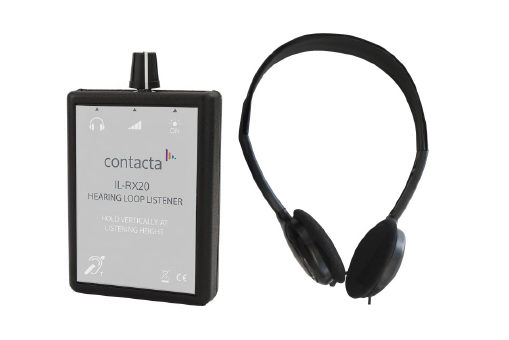
Contacta receiver and headphones, also called "loop listener"

Ampetronic Testing a Hearing Loop System with an ILR3+  (video 3:53)

Ampetronic ILR3+ receiver and headphones

Univox

With the Univox receiver/testing device: green indicates that the loop fulfills the international standard IEC 60118-4 level requirement. A yellow LED indicates that the loop is operational but does not meet the IEC level requirement, but will still benefit the user.
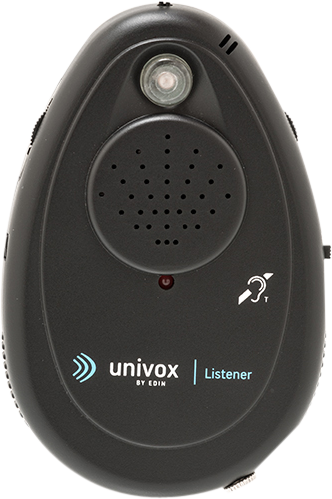
Univox loop receiver and tester

Common Troubleshooting (for Facilities)

  1. Hearing loop driver plugged into an electrical outlet?
  2. Hearing loop driver turned on?
  3. Hearing loop driver connected to the audio mixer? (commonly there is a cord from the ‘audio out’ on the sound mixer to ‘audio in’ on the hearing loop driver).
  4. Hearing loop driver – are the hearing loop output connections are still connected to the driver?
  5. Audio mixer, many mixers are programmable. Check to see if the settings for the mixer audio output that feeds the hearing loop driver have not changed.
  6. If the hearing loop is still not working, contact a hearing loop installer who is skilled in troubleshooting.

Why Meet the IEC Standard for Hearing Loop System Installation? HLAA-Hearing Loss Association of America (2 pages, pdf)

Buzzing is caused by EMI, not the hearing loop. See EMI Glossary

Probably the hearing loop is a perimeter loop and not a phased array. Contact a knowledgeable hearing loop installer.

See hearing loop diagrams (this website)

With a hearing loop, there should be no delay (latency). Contact a knowledgeable hearing loop installer (this website) to analyze and solve the problem.

Resources